

CNCFixtech
Member
- Joined
- Jun 12, 2025
- Messages
- 5
Hi everyone,
Just wanted to share something important that might save you a lot of time and trouble—backing up the SRAM on your FANUC CNC controller. It's a simple process, but often forgotten until something goes wrong, like a dead battery or system reset.
Here's a quick guide based on the FANUC 0i-TD controller:
1. Power On and Enter System
By the way, we've also made a short video showing this whole process. If you're interested, just drop a comment below and I'll be happy to share it!
Thanks for reading, and I hope this helps someone out there. Feel free to share your own tips or backup habits—I'd love to hear how others handle this!
Just wanted to share something important that might save you a lot of time and trouble—backing up the SRAM on your FANUC CNC controller. It's a simple process, but often forgotten until something goes wrong, like a dead battery or system reset.
Here's a quick guide based on the FANUC 0i-TD controller:
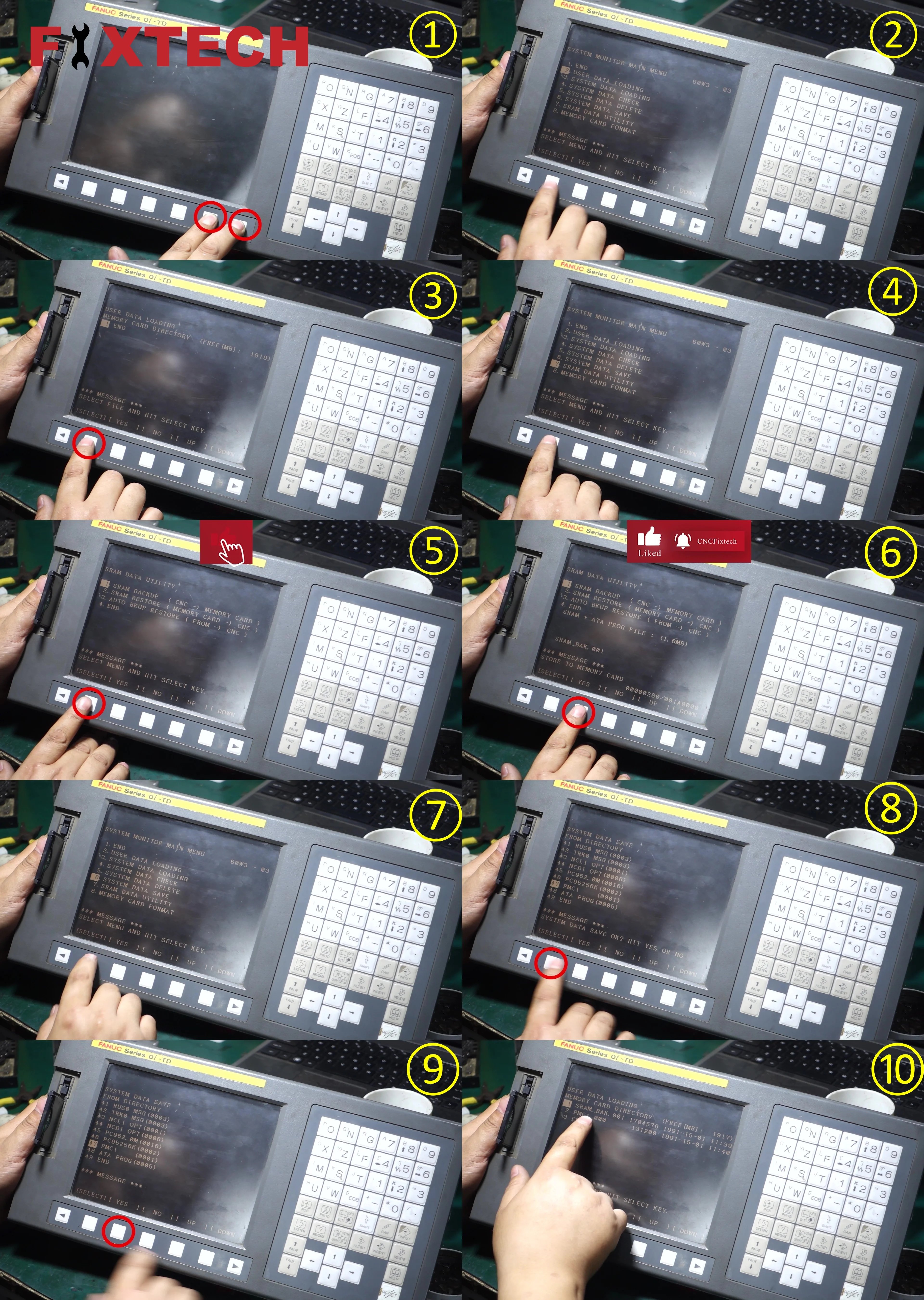
1. Power On and Enter System
- Press and hold the power button to turn on the machine.
- Navigate to the system parameters page.
- Ensure the SRAM card is properly inserted into the slot.
- Open the system menu.
- Select the second option: USER DATA LOADING.
- Check that the SRAM card is empty (no parameters stored).
- Select END to return to the previous menu.
- From the system menu, select the seventh option: SRAM DATA UTILITY.
- Choose the first option: SRAM BACKUP (CNC → Memory Card).
- Confirm by selecting YES, and wait for the backup to complete.
- Return to the system menu and select the sixth option: SYSTEM DATA SAVE.
- Scroll through the options and select option 47: PMC1.
- Confirm by selecting YES, and wait for the backup process to finish.
- Go back to the system menu and select USER DATA LOADING again.
- Check that the SRAM card now contains both parameter and PMC data.
- If the files are present, the backup process is successfully completed.
By the way, we've also made a short video showing this whole process. If you're interested, just drop a comment below and I'll be happy to share it!
Thanks for reading, and I hope this helps someone out there. Feel free to share your own tips or backup habits—I'd love to hear how others handle this!

